When it sulks
Troubleshooting
Match your folder against the reference shots and fix the usual suspects.
Almost every install problem is one of a handful of usual suspects — and the fastest way to find yours is to compare your folders against the reference shots below, then work down the symptoms. Nine times out of ten it’s the wrong BepInEx build.
The number-one cause: the wrong BepInEx
PAC-MAN WORLD Re-PAC is Unity IL2CPP, 64-bit. It needs the IL2CPP · win-x64 · BleedingEdge build — not the Mono build, not x86, not a stable 5.x release. If anything below is going wrong, check this first.
Sanity check
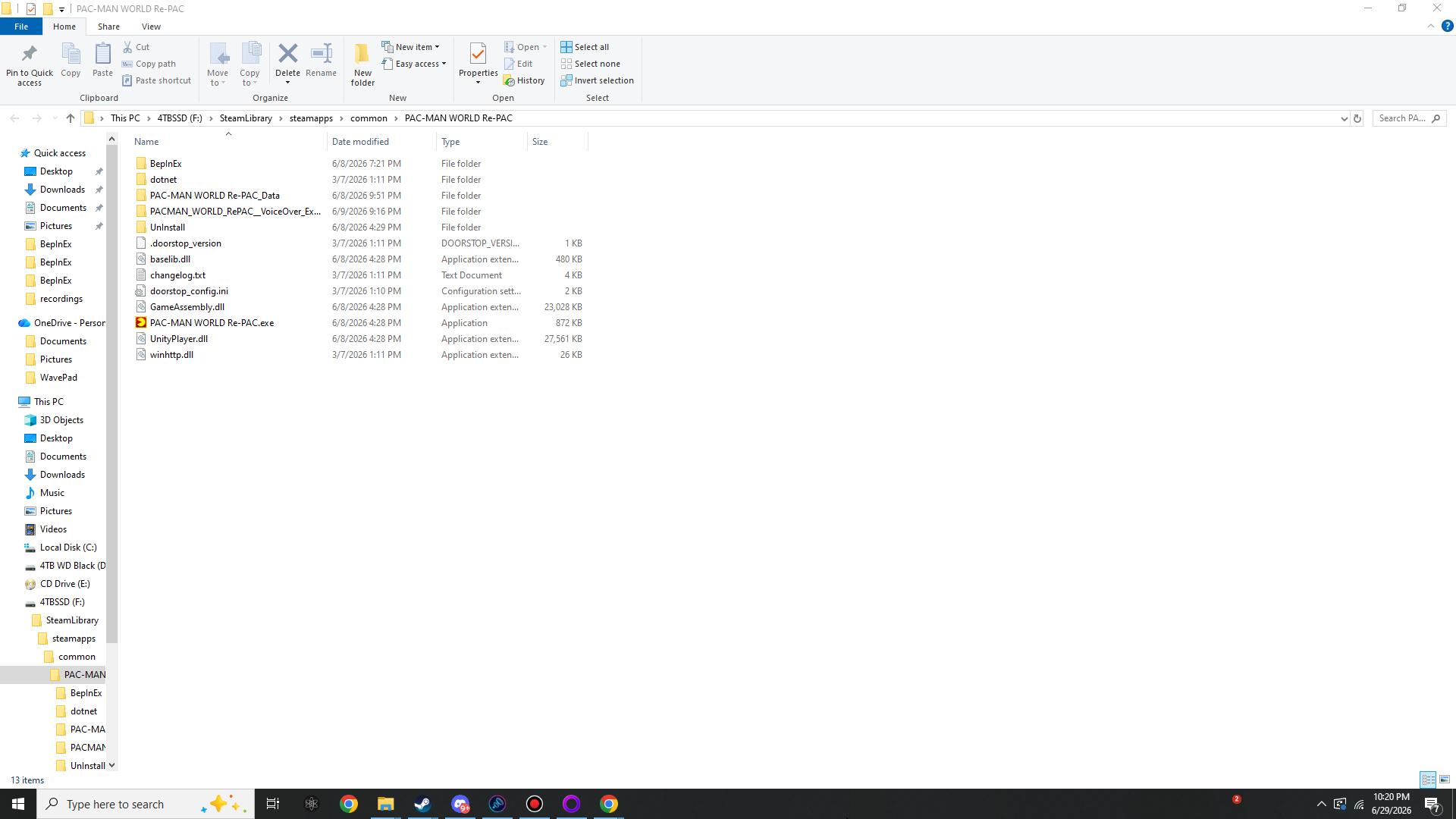
Match your folders against these
A correct install looks exactly like this at each level. Click any image to open it at full 1920×1080 resolution, then use ← → to step between them and Esc to close.



Symptom
BepInEx didn’t generate its folders
You extracted BepInEx, launched the game, but BepInEx/core/, BepInEx/plugins/ and the
others never appeared (and BepInEx/LogOutput.log is missing). Work down this list:
- You didn’t actually launch the game. BepInEx only builds those folders on a real run. Start the game once and let it reach the menu.
- Wrong extraction location.
winhttp.dll,doorstop_config.iniand theBepInExfolder must sit in the same folder asPAC-MAN WORLD Re-PAC.exe— not in a sub-folder, and not one level up. Compare against the game-root shot above. - You unzipped the wrong build. A Mono-only or x86 archive won’t inject into this game at all (no folders, no log). See the next section.
- Antivirus ate
winhttp.dll. The proxy DLL is exactly the kind of file some AV tools quarantine. Check quarantine, restore it, and add the game folder as an exclusion. - Steam launch options are stripping it. If you set custom launch options, make sure they still end in
%command%so the game actually starts with BepInEx’s proxy in place.
“Same folder as the .exe” is the rule that catches most people
If your BepInEx folder ended up at …\common\BepInEx\ instead of …\common\PAC-MAN WORLD Re-PAC\BepInEx\, move it. The full walkthrough is in Step 01.
Symptom
You grabbed the wrong BepInEx build
There are several BepInEx downloads and only one is correct for this game. Here’s how to tell them apart:
- IL2CPP, not Mono. The game ships
GameAssembly.dllin its root — that’s the signature of IL2CPP. The Mono build of BepInEx simply will not load here. - win-x64, not x86. The game is 64-bit. The x86 (32-bit) build won’t inject.
- BleedingEdge (be.###), not stable 5.x. IL2CPP support lives in the BepInEx 6 BleedingEdge line. You want the artifact named like:
BepInEx-Unity.IL2CPP-win-x64-6.0.0-be.785+6abdba4.zip
Download it from the BepInEx BleedingEdge build server
— pick the row labelled BepInEx Unity (IL2CPP) for Windows (x64). The exact build (currently
be.785) doesn’t matter as long as it’s the newest IL2CPP win-x64.
Symptom
BepInEx loads, but the plugin doesn’t
The BepInEx folders exist and the log is being written, but ramps are still broken and no
com.stixsworldhd.pacmanworldrepac.ungodlybugfix.cfg ever appears in BepInEx/config/. Check:
- The
.dllis in the right folder. It must be directly insideBepInEx/plugins/—BepInEx\plugins\StixsworldHD.PacManWorldRePac.UngodlyBugfix.dll— not in a sub-folder, and not still in your Downloads or inside the original archive. - You launched after dropping it in. The config file (and the fix) only appear once you start the game with the plugin present.
- Windows blocked the file. If the
.dllcame out of a zip from the internet, right-click it → Properties → tick Unblock → Apply, then relaunch. - It loaded but you missed it. Open
BepInEx/LogOutput.logand search for the GUIDcom.stixsworldhd.pacmanworldrepac.ungodlybugfix— if it’s there, the plugin is running.
For comparison, a correctly placed plugin and its generated config look like this:
Read the log, not the vibes
The log is the source of truth. If you see the suite’s banner and a CAPTURED GAME BASELINE block, it loaded — and any remaining oddness is a tuning question for Configure, not an install problem.
Symptom
The game crashes on launch
If the game launched fine before the plugin and crashes only with it present, the usual cause is an IL2CPP interop mismatch — the plugin’s field and method bindings are generated against a particular Il2CppInterop era, and a wildly mismatched BepInEx build can fail to line them up.
- Use a matching BleedingEdge build. Install a current IL2CPP win-x64 BleedingEdge build (the same Il2CppInterop generation the game’s interop assemblies were built with). Re-extracting the newest one usually resolves it.
- Let the interop generate cleanly. The first launch after installing BepInEx can be slow while it builds
BepInEx/interop/. Don’t kill it — wait for the menu. - Rule out the plugin. Temporarily remove the
.dllfromBepInEx/plugins/and launch. If it’s stable without the plugin and crashes with it, you’re looking at a build-era mismatch, not a broken game.
The plugin tries hard not to be the crash
Every patch is guarded and fail-safe — an unexpected error in any single fix is logged and swallowed rather than taking down the controller. So a hard crash on launch points at the loader/interop layer underneath, which is why the fix is almost always “use a matching BepInEx build.”
Symptom
I don’t get a console window
BleedingEdge builds don’t always show a console by default. You don’t need one — everything also goes to
BepInEx/LogOutput.log — but if you want the live window, enable it in
BepInEx/config/BepInEx.cfg after your first launch:
[Logging.Console]
Enabled = true
Save and relaunch. Either way, the log file already contains the same banner and baseline dump.
Linux & Steam Deck
Running through Proton
Under Proton, Wine needs to be told to use BepInEx’s winhttp proxy. Set this as the game’s
Steam launch option (right-click the game → Properties → Launch Options):
WINEDLLOVERRIDES="winhttp=n,b" %command%Keep the trailing %command%. Then launch once so the folders generate, exactly as on Windows.
Last resort
Still stuck? Read the log
Open BepInEx/LogOutput.log — it answers almost every question:
- Near the top it prints the BepInEx version and confirms it’s running in IL2CPP mode. If you don’t see IL2CPP, you have the wrong build.
- Search for the GUID
com.stixsworldhd.pacmanworldrepac.ungodlybugfixto confirm the plugin loaded. - Search for
CAPTURED GAME BASELINEto confirm it read the controller’s real values — the point where tuning becomes possible.
Start over cleanly
Delete the whole BepInEx folder plus winhttp.dll, doorstop_config.ini and .doorstop_version from the game root, then redo Step 01. Steam → Verify integrity of game files restores anything you remove by accident.